Friday, 3 March 2017

How to Hack Web Browsers with BeEF...through Kali Linux


Welcome back to MyAiM's Hacker...


I had promised new series on hacking web applications, mobile devices, and even Facebook here on AiM Trick's and I intend to deliver you those sometime this year. In each of those topics, I will introduce you to new hacking tools and techniques, though, one tool that we will be using in all of those areas is called the Browser Exploitation Framework , or BeEF (don't ask me what the lowercase "e" stands for).

Similar to Metasploit , BeEF is a framework for launching attacks. Unlike Metasploit, it is specific to launching attacks against web browsers. In some cases, we will be able to use BeEF in conjunction with Metasploit to launch particular attacks, so I think its time for us to become familiar with it.


BeEF was developed by a group of developers led by WADE ALCORN. Built on the familiar Ruby on Rails platform, BeEF was developed to explore the vulnerabilities in browsers and test them. In particular, BeEF is an excellent platform for testing a browser's vulnerability to cross-site scripting (XSS) and other injection attacks.

STEP=>1


*Start Cooking BeEF


BeEF is built into Kali Linux , and it can be started as a service and accessed via a web browser on your localhost. So let's start by firing up Kali and cooking a bit of BeEF. Start the BeEF service by going to "Applications" -> "Kali Linux" -> "System Services" -> "BeEF" -> "beef start."


STEP=>2


*Opening a Browser to BeEF


The BeEF server can be accessed via any browser on our localhost (127.0.0.1) web server at port 3000. To access its authentication page, go to:


http://localhost:3000/ui/authentication


The default credentials are "beef" for both username and password.


Great! Now you have successfully logged into BeEF and are ready to begin using this powerful platform to hack web browsers.

Note that in the screenshot below that my local browser, 127.0.0.1, appears in the left hand "Hooked Browsers" explorer after I clicked on the link to the demo page. BeEF also displays its "Getting Started" window to the right.


STEP=>3


*Viewing Browser Details


If I click on the local browser, it will provide with more choices to the right including a "Details" window where we can get all the particulars of that browser. Since I am using the Iceweasel browser built into Kali, which is built upon Firefox, it shows me that the browser is Firefox.

It also shows me the version number (24), the platform (Linux i686), any components (Flash, web sockets, etc.), and more information that we will be able to use in later web application hacks.


STEP=>4


*Hooking a Browser


The key to success with BeEF is to "hook" a browser. This basically means that we need the victim to visit a vulnerable web app. This injected code in the "hooked" browser then responds to commands from the BeEF server. From there, we can do a number of malicious things on the victim's computer.

BeEF has a JavaScript file called "hook.js," and if we can get the victim to execute it in a vulnerable web app, we will hook their browser! In future tutorials, we will look at multiple ways to get the victim's browser hooked.

In the screenshot below, I have "hooked" an Internet Explorer 6 browser on an old Windows XP on my LAN at IP 192.168.89.191.


STEP=>5


*Running Commands in the Browser


Now, that we have hooked the victim's browser, we can use numerous built-in commands that can executed from the victim's browser. Below are just a few examples; there are many others.

☣Get Visited Domains
☣Get Visited URLs
☣Webcam
☣Get All Cookies
☣Grab Google Contacts
☣Screenshot

In the screenshot below, I selected the "Webcam" command that many of you may be interested in. As you can see, when I execute this command, an Adobe Flash dialog box will pop up on the screen of the user asking, "Allow Webcam?" If they click "Allow," it will begin to return pictures from the victim's machine to you.

Of course, the text can be customized, so be imaginative. For instance, you could customize the button to say "You have just won the lottery! Click here to collect your winnings!" or "Your software is out of date. Click here to update and keep your computer secure." Other such messages might entice the victim to click on the box.


STEP=>6


*Getting Cookies


Once we have the browser hooked, there is almost unlimited possibilities of what we can do. If we wanted the cookies of the victim, we can go to "Chrome Extensions" and select "Get All Cookies" as shown in the screenshot below.


When we click on the "Execute" button to the bottom right, it will begin collecting all the cookies from the browser. Obviously, once you have the user's cookies, you are likely to have access to their websites as well.


BeEF is an extraordinary and powerful tool for exploiting web browsers. In addition to what I have shown you here, it can also be used to leverage operating system attacks. We will be using it and other tools in my new series on hacking web applications, mobile devices, and Facebook,.


so keep coming back to AiM Trick's...


Sunday, 26 February 2017

How to Find the Exact Location of Any IP Address


Welcome back to MyAiM's Hacker !


Have you ever wondered where the physical location of an IP address is? Maybe you want to know if that proxy server you are using is actually out of your local legal jurisdiction. Or, maybe you have the IP address of someone you are corresponding with and want to make certain they are where they say they are. Or, maybe you are a forensic investigator tracking down a suspect who wrote a threatening email or hacked someone's company.


Now you can find the location of that IP address without a subpoena or search warrant.


A company calledMAXMIND maintains a database of the location of every IP address on the planet complete with GPS coordinates, area code, zip code, and country.

This database is not in a typical relational database format, but rather in a flat file. MaxMind charges a $370 site license and $90/month (or $1360/year) for updates to this database. Their software has a beautiful front end that makes querying the database easy enough that even Windows or Mac users can manage.

MaxMind also gives away a free developers version of this database without any software or tools to read it. Although slightly less accurate than the commercial version, the price is certainly right. All we need to find the location of the IP is a program to read this data.


Two programmers, Jennifer Ennis and T. Williams, have developed a small Python script called pygeoip and released it under the GPL license that enables us to input an IP address and output this critical information.


STEP=>1


Fire Up Kali & Open a Terminal


The first step, of course, is to fire up our our trusty
Kali system, or in this case, any Linux distribution . Then, open a terminal.


Note: Be cautious of the formatting below for commands. The formatting of this article will create big space gaps since it stretches lines out to fit the margins. This is because of long URLs that try to fit themselves on a separate line. Large spaces equals just one space, so keep that in mind. Refer to the screenshots to see how they actually look.


STEP=>2


Download the Database


Now we need to download the database from MaxMind, and we can get it by typing the following.


kali > wget -N -q
http://geolite.maxmind.com/download/geoip/database/GeoLiteCity.dat.gz


Then we need to unzip it.


kali> gzip -d GeoLiteCity.dat.gz


Let's now check that the database is in place by listing the directory.


kali > ls -alh GeoLiteCity.dat


STEP=>3


Download & Install Pygeoip


Next, we need to install the Python script to read the database, pygeoip. We can download it by typing the following.


kali > wget http://pygeoip.googlecode.com/files/pygeoip-0.1.3.zip


Then, unzip it.

kali > unzip pygeoip-0.1.3.zip


We next need to download some setup tools into the pygeoip directory.

kali > cd /pygeoip-0.1.3


kali > wget http://svn.python.org/projects/sandbox/trunk/setuptools/ez_setup.py


kali > wget http://pypi.python.org/packages/2.5/s/setuptools-0.6c11-py2.5.egg


Let's now move and then build and install the setup tools.

kali > mv setuptools-0.6c11-py2.5.egg setuptools-0.7a1-py2.5.egg


kali > python setup.py build

kali > python setup.py install


We need to move the database to the pygeoip directory so that script can access it without having to use the full path.

kali > mv GeoLiteCity.dat /pygeoip-0.1.3/GeoLiteCity.dat


STEP=>4


Query the Database


Now that we have the database in place and the pygeoip script downloaded and installed, we can begin to query that database with pygeoip.

First, we need to start a Python shell.

kali > python

Then, you will be greeted will the triple >>> indicating you are now in an interactive python shell. Let's import the module and instantiate the class.

>>>import pygeoip

>>>gip =

pygeopip.GeoIP('GeoLiteCity.dat')
Next, we are ready to begin our query. Let's see where Google is located.

>>>rec =

gip.record_by_addr('64.233.161.99')

>>>for key.val in rec.items():

... print "%s: %s" %(key,val)

...


Please note that it is critical to indent the "print". If not, you will throw an error.

As you can see, we were able to locate Google's IP in Mountain View, CA at area code 650, postal code 94043, longitude -122.0574, and latitude 37.4192. Not bad! Now, let's try to locate the IP of cnn.com.


Once again, the combination of the database and pygeoip script was able to provide us with key location information on CNN's IP address.


This little tool is great for locating any IP address in the world, albeit, it is a bit clunky. Maybe someone here in the Null Byte community with good Python skills would like to write an interactive script with a nice user interface where the user can simply enter the IP and get the record information?


Keep coming back to MyAiM's Community, as we continue to explore the tools and techniques of hacking!


Sunday, 19 February 2017

How to Get Facebook Credentials Without Hacking Facebook


Welcome back to AiM TrIcK$


Many people come to Aim Tricks looking to hack Facebook without the requisite skills to do so. Facebook is far from unhackable, but to do so, you will need some skills , and skill development is what AiM Tricks is all about.


Sometimes, if you have a bit of skill, a bit of luck, and a bit of social engineering, you can get Facebook credentials. That's what this tutorial is all about. If you don't take the time to install Kali and learn a little about networking and Linux , this won't work for you—but if you are willing to take a little time to study here at AiM Tricks , you can probably gain access to someone's Facebook credentials very easily with this little trick.


STEP>1


INSTALL KALI LINUX IN YOUR PC


The first step is to download and install Kali Linux . This can be done as a standalone operating system, a dual-boot with your Windows or Mac system, or in a virtual machine inside the operating system of your choice. No, this cannot be done with Windows! Windows, for all its strengths and ease of use, is not an appropriate hacking operating system .

Within Kali, there is an app called the Browser Exploitation Framework (BeEF) . It is capable of helping you hack the victim's browser and take control of it. Once you have control of their browser, there are so many things you can do. One of them is to trick the user into giving away their Facebook
credentials, which I'll show you here.


STEP>2


OPEN BEEF


Fire up Kali, and you should be greeted with a screen like below. You start up BeEF by clicking on the cow icon to the left of the Kali desktop.


When you click on it, it starts BeEF by opening a terminal.


BeEF is an application that runs in the background on a web server on your system that you access from a browser. Once BeEF is up and running, open your IceWeasel browser to access its interface. You can login to BeEF by using the username beef and the password beef.


You will then by greeted by BeEF's "Getting Started" screen.


STEP>3


HOOK THE VICTIM'S BROWSER


This is the most critical—maybe even the most difficult part—of this hack. You must get the victim to click on a specially designed JavaScript link to "hook" their browser. This can be done in innumerable ways.


The simplest way is to simply embed the code into your website and entice the user to click on it. use your imagination.


The script looks something like below. Embed it into a webpage, and when someone clicks on it, you own their browser! (Comment below if you have any questions on this; You might also use the MitMf to send the code to the user, but this requires more skill.)


From here, I will be assuming you have "hooked" the victim's browser and are ready to own it.


STEP>4


SEND A DIALOG BOX TO THE USER


When you have hooked the victim's browser, its IP address, along with the operating system and browser type icons, will appear in the "Hooked Browsers" panel on the left. Here, I have simply used my own browser to demonstrate.

If we click on the hooked browser, it opens a BeEF interface on the right side. Notice that it gives us the details of the browser initially. It also provides us with a number of tabs. For our purposes here, we are interested in the 'Commands" tab.


Click on the "Commands" tab, then scroll down the "Modules Tree" until you come to "Social Engineering" and click to expand it. It will display numerous social engineering modules. Click on "Pretty Theft," which will open a "Module Results History" and "Pretty Theft" window.


This module enables you to send a pop-up window in the user's browser. In our case, we will be using the Facebook dialog box.


If we click on the "Dialog Type" box, we can see that this module can not only create a Facebook dialog box, but also a LinkedIn, Windows, YouTube, Yammer, and a generic dialog box. Select the Facebook dialog type,then click on the "Execute" button the the bottom.


STEP>5


THE DIALOG BOX APPEARS ON THE TARGET SYSTEM


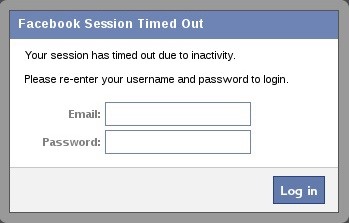
When you click "Execute" in BeEF, a dialog box will appear in the victim's browser like that below. It tells the victim that their Facebook session has expired and they need to re-enter their credentials.


Although you may be suspicious of such a pop-up box, most users will trust that their Facebook session expired and will simply enter their email and password in.


STEP>6


HARVEST THE CREDENTIALS


Back on our system in the BeEf interface, we can see that the credentials appear in the "Command results" window. The victim has entered their email address "loveofmylife@gmail.com" and their password "sweetbippy" and they have been captured and presented to you in BeEF.


If you are really determined to get those Facebook credentials, it can be most definitely be done, and this is just one way of many methods (but probably the simplest).
If you you want to develop the skills to an even higher level, start studying here at Null Byte to master the most valuable skill set of the 21st century—hacking!


Featured post

How to copy (steal) files from a computer to a pendrive (Latest VIRUS)

Hello guys,have u ever want something from your friend pc,that he is not giving you like games,movies,important files etc. here icome...